The kitchen sees the order
the moment it’s sent. No paper.
Instead of shouting to the kitchen or sending a slip, the order appears on a screen in front of the cook, split across preparation stations. A real screenshot, with a sample shop’s data.
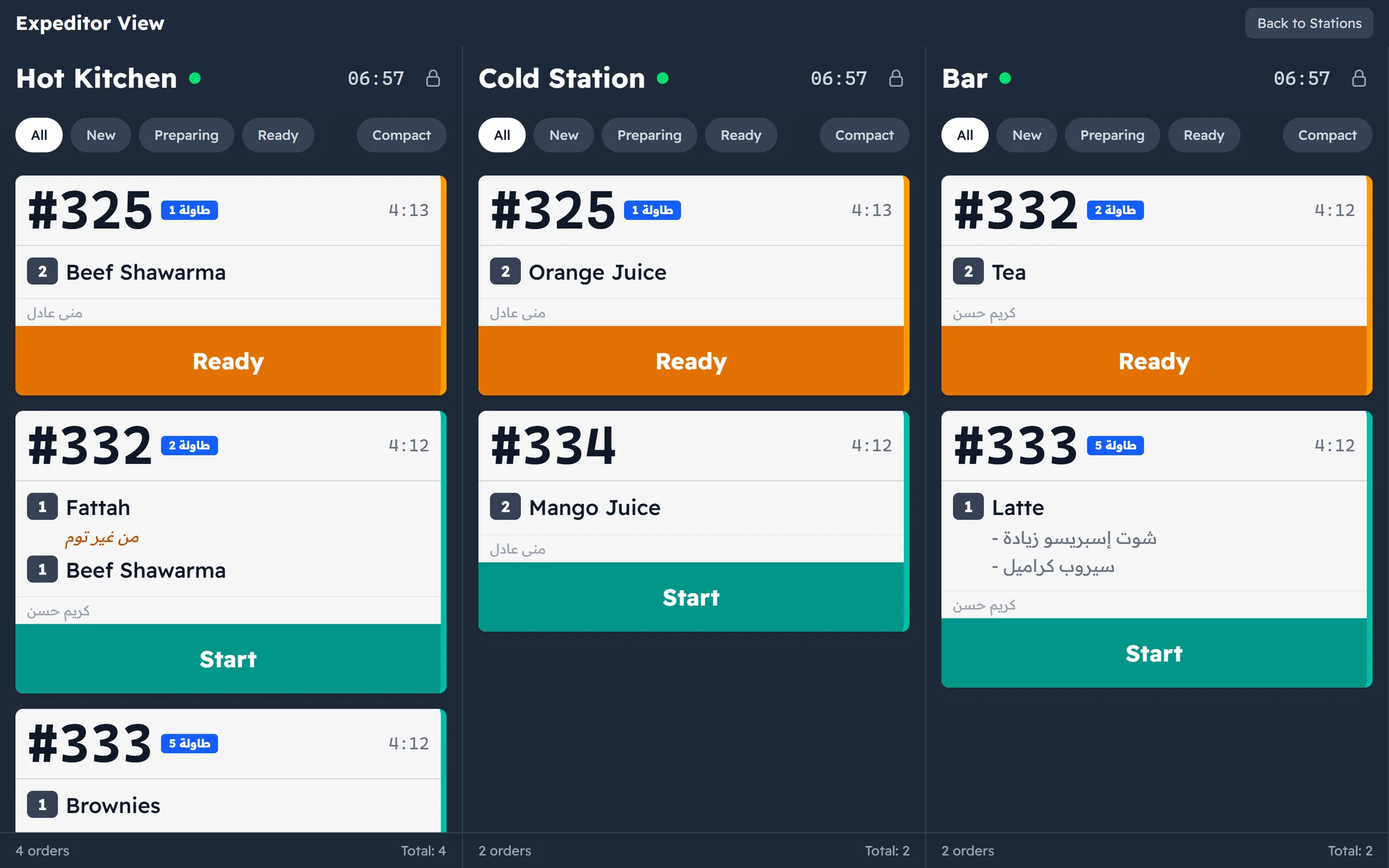
Orders split across stations by themselves.
A guest orders a shawarma, a mango juice and a coffee on one ticket — three people make them in three places. Major routes each item by its category: hot dishes to the hot kitchen, juices to the cold station, coffee to the bar.
- Map each category to a station once; every order routes itself after that
- Cooks see only the items that are theirs
- Items that need no preparation never reach the kitchen
Every card says what matters.
A large ticket number for calling and handing over, the table or order type, items with quantities and add-ons, a waiting timer since the order was sent, and who sent it.
- Clear states: new, preparing, ready, then served
- Rush orders stand out, with their own sound
- A compact view for busy services
Every station in one place.
Beside each station’s own screen, the all-stations view brings the whole kitchen together for the expeditor — so an order goes out only when every station has finished.
- An open-order count under every station
- Lock the screen to wipe it without stray taps
- Reconnects by itself, without losing an order
On any screen
The kitchen display runs in the browser on any device on the shop network — a tablet, an old PC or a wall-mounted TV. No special hardware and no extra licence for the screen, and everything stays on the local network. Its colours are dark on purpose, with large type that reads from across a hot, brightly lit kitchen.
Requirements
| Device | Anything with a modern browser on the shop network. |
|---|---|
| Network | The shop’s local network — nothing goes over the internet. |
| Stations | One or more, plus a combined all-stations view. |
| Routing | By category: each product category maps to a station. |
Questions about the kitchen display
How does an order reach the right station?
You map each product category to a preparation station once in settings. From then on every item in that category goes to its station automatically, and one order can be split across several stations at once.
Do I need special hardware?
No. The kitchen display opens in the browser on any device on the shop network — a PC, a tablet, or a TV with a small computer attached.
What if my kitchen is a single station?
That works too. Run one station that shows every order, or use the all-stations view.
Does it work without the internet?
Yes. Everything runs over the shop’s local network between the tills and the kitchen display, with no internet connection.