Tills and pairing
Every till PC is paired with the server once — with a PIN, or by itself on the server PC — and gets its own receipt printer.
- Who can do this
- Owner
- Permission needed
- «Manage Settings»
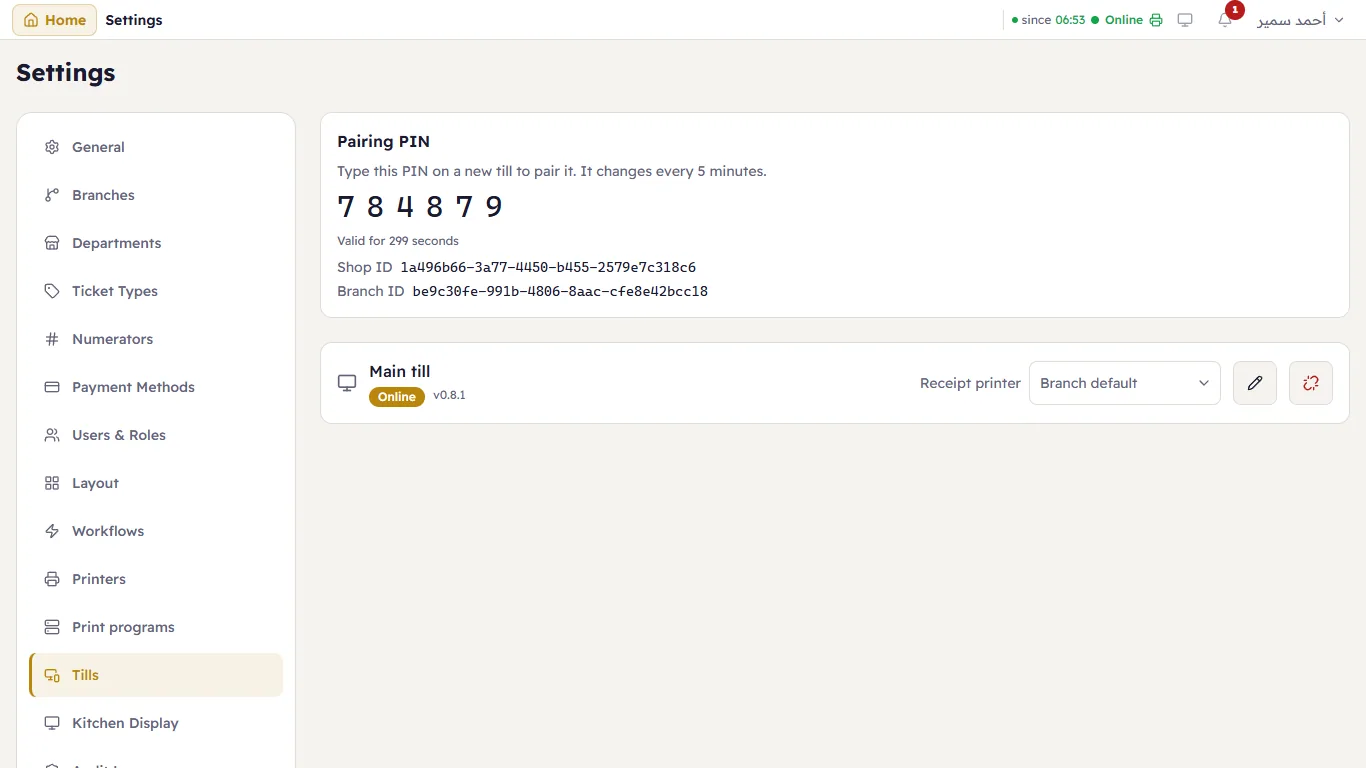
Settings → Tills:
Pair a till
A till must be paired with the server before it can sell. Each paired till takes one seat of your licence.
- The server PC's own till pairs itself the first time the sign-in page opens there. Nothing to do.
- Any other PC: open the till app there; it asks for the Pairing PIN. The PIN is shown here, at the top. It changes every 5 minutes. Type it on the new till, and the till appears in the list.
A pairing does not expire: the till stays paired until you revoke it.
Each till
The row shows the till's name, whether it is Online, and the version of its till app.
- Receipt printer — the printer this till's receipts print on. Branch default takes the branch's default printer. Set it on every till when the shop has several receipt printers, so each sale prints at the till that made it.
- The pencil renames the till.
- Revoke — for a PC that is lost, sold or replaced: the till stops selling and its seat is freed. Pairing it again makes a new till.
See also Print programs: the program on each till that drives its printers.