Open tickets and a new ticket
See every ticket not yet closed, go back to any of them, or start a new one.
- Who can do this
- Cashier Waiter Manager Owner
- Permission needed
- «Open Ticket»
You may have several orders on the go at once — tables, a delivery on its way, a customer still choosing. These are all open tickets.
See them and go back to any of them
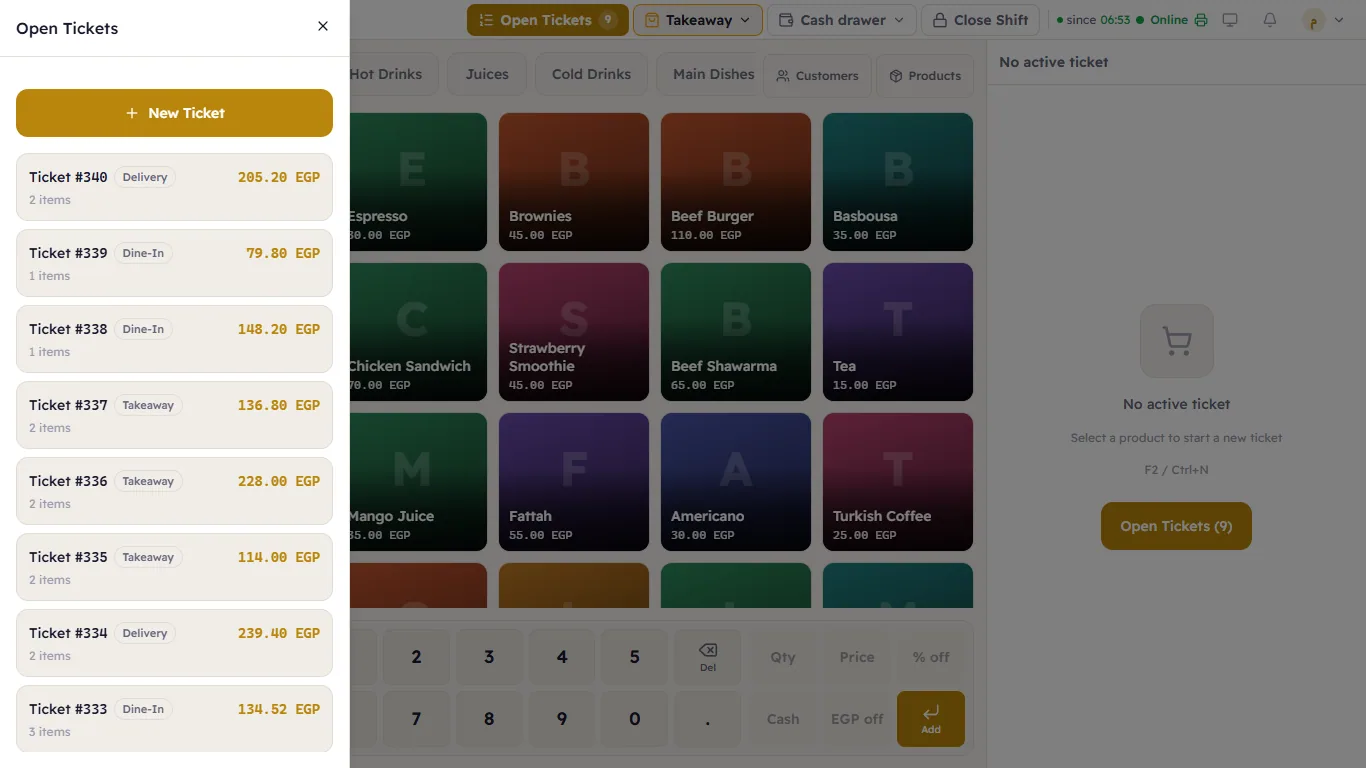
- Press Open Tickets in the header (or F9). The number on it is how many tickets are open.
- The Open Tickets list opens: each ticket with its number and type (such as Dine-In, Delivery or Takeaway), its number of items and its amount.
- Tap a ticket to open it and carry on.
A new ticket
- From the same list: New Ticket.
- From the keyboard: F2 or Ctrl+N.
- Or simply: if no ticket is open in front of you, the first item you tap opens a new one.
The ticket you had open is not closed — it stays in the list until you come back to it.
An empty ticket opened by mistake
If you opened a ticket and added nothing, you can cancel it with Cancel Ticket (see Void and reopen).