Purchase invoices
Post the supplier's invoice — the goods come into stock with their lots and cost, and the debt goes on the supplier's account.
- Who can do this
- Manager Owner
- Permission needed
- «Manage Procurement»
A purchase invoice does two things at once: the goods come into stock, and what you owe goes on the supplier's account. From the supplier's card press Purchase invoice (or Purchase invoice at the top of Suppliers):
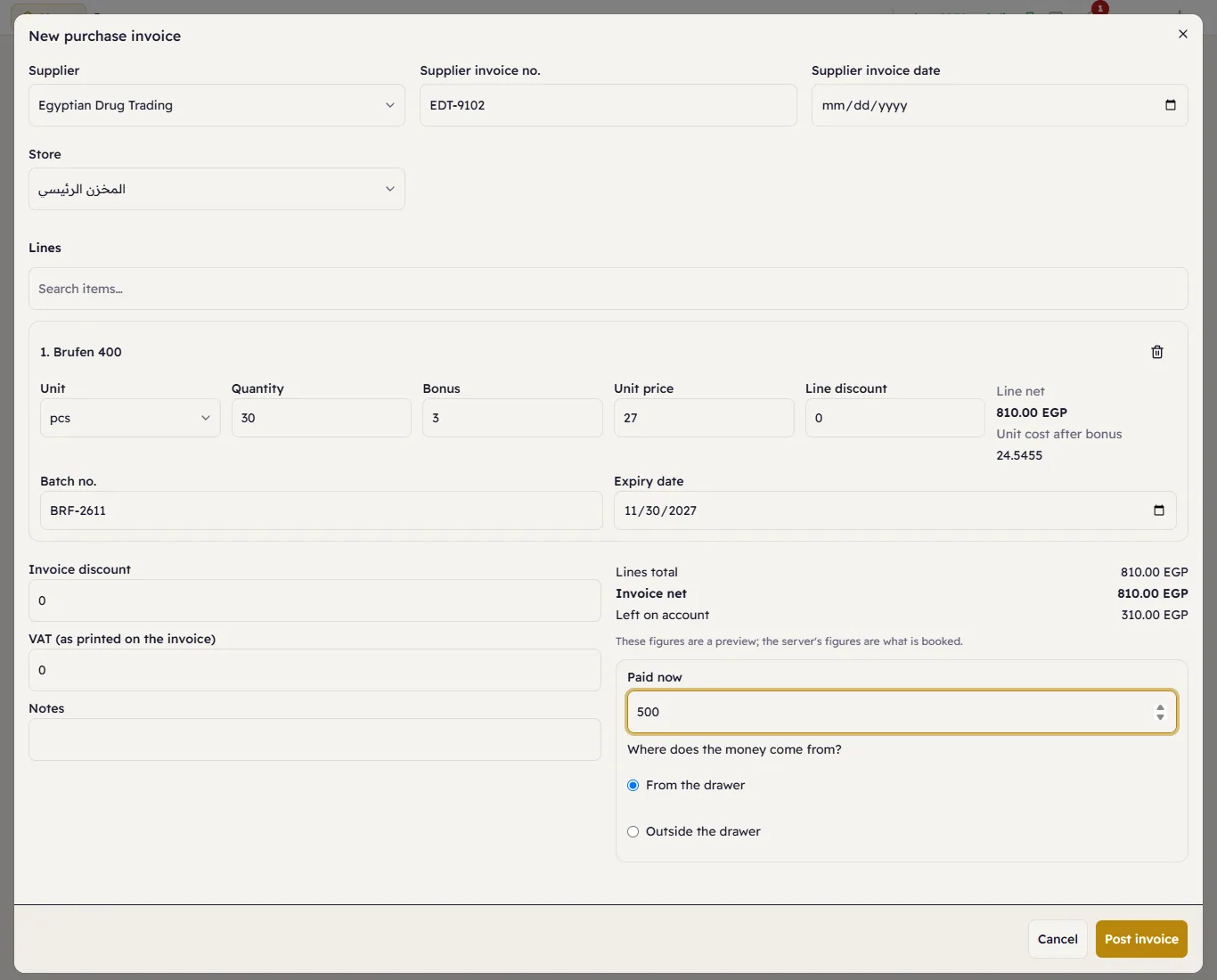
- Supplier, the Supplier invoice no. and Supplier invoice date printed on their invoice, and the Store the goods go into.
- Under Lines, search for each item and press it. For each line: the Unit, Quantity, Bonus (free units the supplier added), Unit price and Line discount. Major shows the Line net and the Unit cost after bonus — the bonus lowers the cost of every unit.
- A batch item needs its Batch no. and Expiry date; a serial item, each piece's serial number.
- The Invoice discount, the VAT (as printed on the invoice) and notes.
- Paid now — what you pay on the spot, and Where does the money come from?: From the drawer (an open shift is needed) or Outside the drawer (with the payment method). The rest stays Left on account.
- Press Post invoice.
Major numbers it PI-yyyyMMdd-nnnn. The supplier's balance goes up by the invoice net, less what you paid now.