Signing in and out
How to sign in to Major with your email and password, what to do when sign-in is locked, and how to sign out.
- Who can do this
- Everyone
Everyone in the shop has their own account (email and password). Your account decides what you can see and do, so never sign in as someone else — every action is recorded under the account that did it.
Sign in
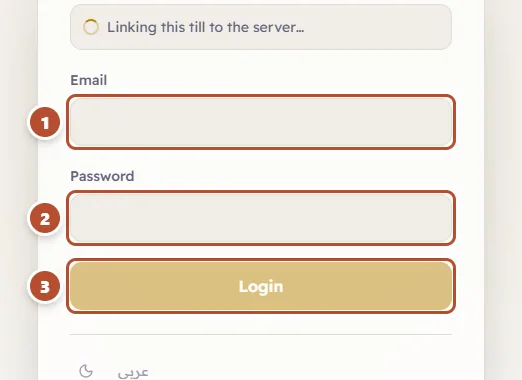
- Type your email in Email (1).
- Type your password in Password (2).
- Press Login (3).
After signing in, Major takes you to the screen you work on: a cashier goes straight to the till; the owner and managers go to the Home screen, or to the screen the owner picked for them (see Home screen and the header).
If you have more than one business
If your account belongs to more than one business, after your email and password you will see Select Business. Choose the business you want to work in, then press Continue.
If the password is wrong
You will see "Invalid email or password." After a few wrong attempts in a row Major warns you: "After several wrong attempts, sign-in is locked for 15 minutes."
Change your password
Open the menu under your name (top corner of the screen) and choose Change Password. Type the Current password, then the New password twice. A password needs at least 8 characters including at least one digit, and must differ from the current one. When you change it, any other device signed in with your account is signed out — useful if someone learned your old password.
Sign out
Open the menu under your name and choose Logout (the last item). Always do this when you leave the device, especially on a till that several people use.